Table of Contents
Project Team
This project was developed by a dedicated team of Software Engineering (Génie Logiciel) students at ENSIAS:



1. Project Context & Motivation
1.1 The Problem Domain
Docker has become the de facto standard for containerizing applications, yet writing correct Dockerfiles remains error-prone. Common issues include:
- Inconsistency: Different teams use different base images, entry points, and configurations
- Security vulnerabilities: Hardcoded credentials, insecure port ranges, missing health checks
- Maintenance burden: Manual updates to Dockerfiles across multiple projects
- Lack of validation: No early detection of configuration errors before deployment
- Documentation overhead: Configuration rationale not captured in the Dockerfile itself
1.2 The Solution Approach
Rather than writing Dockerfiles directly, developers describe their Spring Boot application requirements in a high-level, domain-specific language (DSL). This DSL is then automatically transformed into a valid, optimized Dockerfile through a sophisticated pipeline that:
- Parses textual DSL input into a structured model
- Validates the model against rigorous OCL (Object Constraint Language) constraints
- Generates production-ready Dockerfiles using Acceleo templates
1.3 Project Scope
This project focuses on Spring Boot applications running on Java 17 with the following configurable aspects:
- Application metadata (name, version, port)
- Docker runtime settings (working directory, exposed ports)
- Environment variables and secrets management
- Volume mounts for persistent data
- Health check configuration
1.4 Academic Significance
This project demonstrates practical application of several advanced MDE concepts:
- Domain-Specific Languages (DSL): Using Xtext to create a language tailored to Docker configuration
- Metamodeling: Defining the structure of Docker configurations using Ecore
- Constraint-Based Validation: Applying OCL rules to ensure semantic correctness
- Model-to-Text Transformation: Generating executable artifacts (Dockerfiles) from models
- Tool Integration: Combining multiple Eclipse modeling tools in a cohesive pipeline
2. Model-Driven Engineering Fundamentals
2.1 What is Model-Driven Engineering?
Model-Driven Engineering is a software engineering discipline that emphasizes the creation and exploitation of domain models rather than programming code. In traditional software development, code is the primary artifact. In MDE, models are the primary artifacts, from which code, documentation, and configurations are systematically generated.
2.2 MDE Principles Applied to This Project
| Principle | Application in Our Project |
|---|---|
| Separation of Concerns | Separate what (DSL) from how (Acceleo template) |
| Abstraction | Developers describe configuration intent, not Docker syntax |
| Automation | Parsing, validation, and generation happen automatically |
| Reusability | Same model can generate multiple artifacts (Dockerfile, documentation, etc.) |
| Quality | Constraints enforce correctness before generation |
2.3 The MDE Stack: Metamodels, Models, and Artifacts
METAMODEL LEVEL (ecore)
    └─ Defines: "What is a valid Docker configuration?"
                 Classes: SpringBootApp, DockerConfiguration, Volume, etc.

MODEL LEVEL (.dockerdsl files)
    └─ Instance: "My application is ProductionApp with these settings..."
                 Conforms to metamodel

ARTIFACT LEVEL (Dockerfile)
    └─ Generated: "FROM openjdk:17-jdk-slim..."
                  Derived from model via Acceleo template
3. System Architecture Overview
3.1 Component Overview
| Component | Technology | Responsibility |
|---|---|---|
| docker.dsl | Xtext 2.41.0 | Parse textual DSL into Ecore models |
| emfdockermodel | EMF Ecore | Define metamodel structure and constraints |
| emfdockermodel.acceleo | Acceleo 3.7+ | Transform models to Dockerfile text |
3.2 Three-Phase Architecture
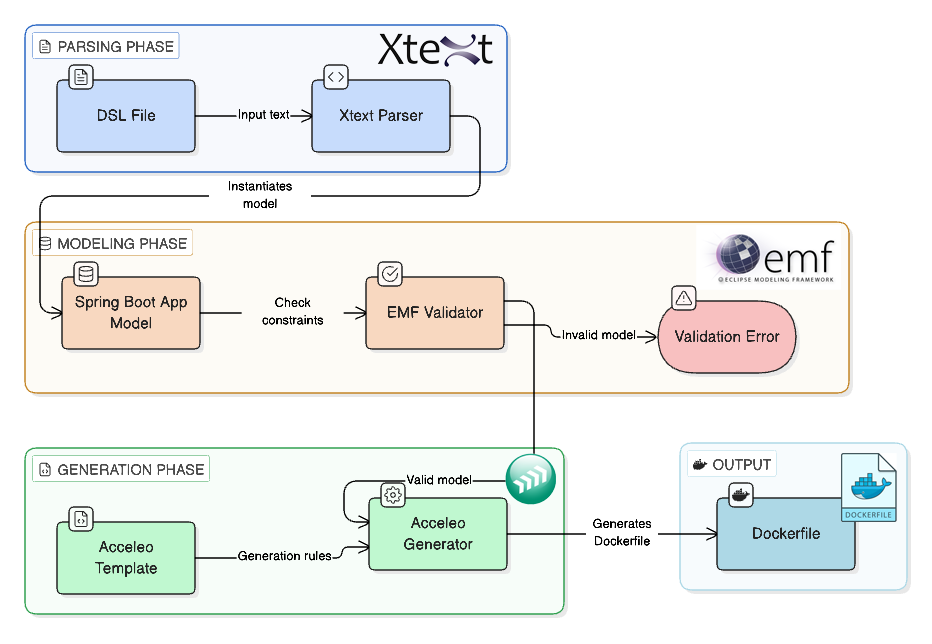
The transformation pipeline consists of three distinct phases, each managed by a specialized tool from the Eclipse Modeling ecosystem:
- Phase 1 - Parsing: Xtext converts textual DSL → Ecore model
- Phase 2 - Validation: EMF enforces constraints via OCL rules
- Phase 3 - Code Generation: Acceleo transforms model → Dockerfile
4. Phase 1: Parsing with Xtext

Xtext 2.41.0 - Language Engineering Framework
Xtext is a framework for developing domain-specific languages (DSLs) with minimal effort. It automatically generates parsers, lexers, content assist, and syntax highlighting from a simple grammar specification.
4.1 The Parsing Phase in MDE Context
4.2 DSL Grammar Definition
The grammar is defined in docker.dsl/src/docker/DockerDsl.xtext using Xtext's simple, ANTLR-like syntax:
grammar docker.DockerDsl

import "platform:/resource/emfdockermodel/model/emfdockermodel.ecore" as docker

SpringBootApp returns docker::SpringBootApp:
    'app' name=ID
    '{'
        'version' version=STRING
        'port' port=INT
        'jar' jarName=STRING
        'java' javaVersion=INT
        dockerConfig=DockerConfiguration
    '}'
;

DockerConfiguration returns docker::DockerConfiguration:
    'docker' '{'
        'workDir' workDir=STRING
        ('expose' exposedPorts+=INT (',' exposedPorts+=INT)*)?
        ('env' envVars+=EnvVar (',' envVars+=EnvVar)*)?
        ('volume' volumes+=Volume)*
        ('health' healthCheck=HealthCheck)?
    '}'
;

EnvVar returns docker::EnvVar:
    key=ID '=' value=STRING
;

Volume returns docker::Volume:
    hostPath=STRING '->' containerPath=STRING
;

HealthCheck returns docker::HealthCheck:
    'endpoint' endpoint=STRING
    'interval' interval=INT
    'timeout' timeout=INT
;
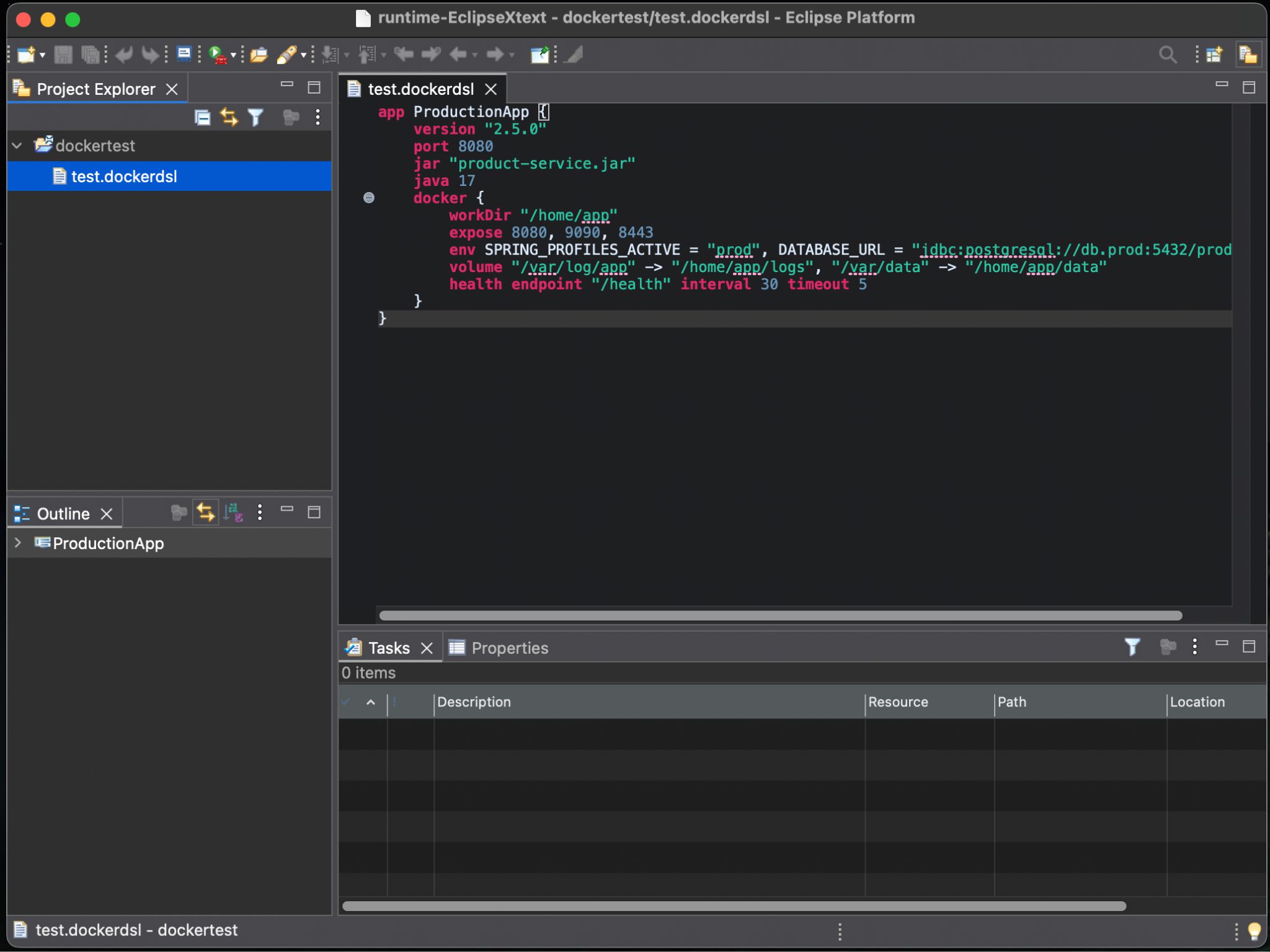
4.3 Example DSL Usage
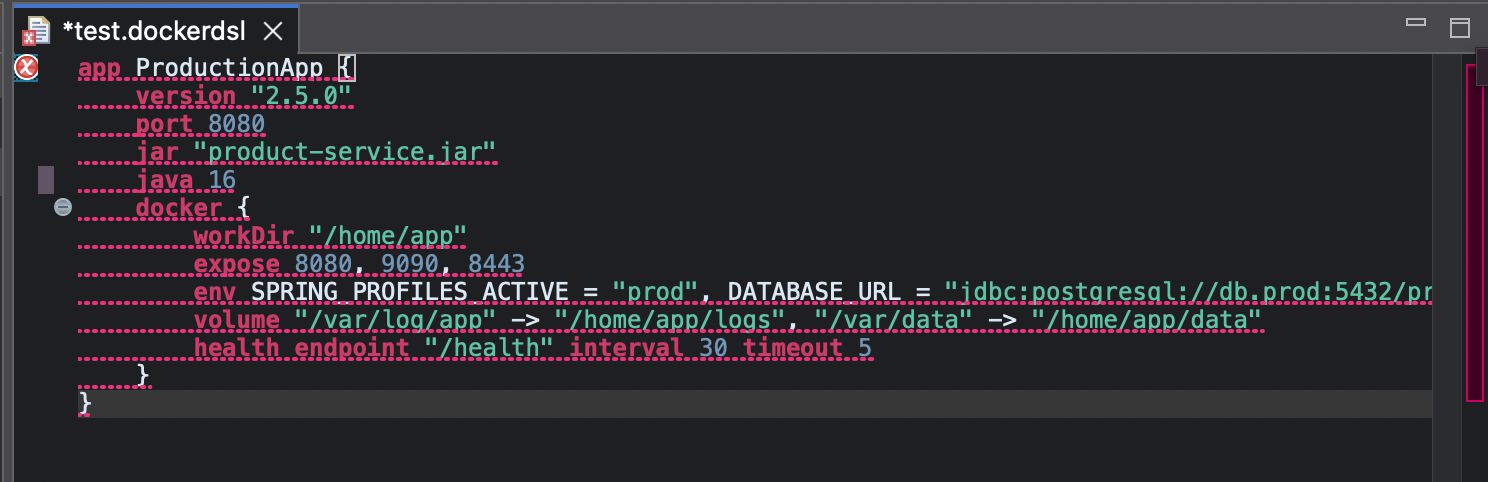
 OCL Violation:
4.4 How Xtext Works
- Grammar Analysis: Xtext parses the grammar definition and generates a parser
- Lexical Analysis: Input DSL is tokenized (keywords, identifiers, strings)
- Syntactic Analysis: Tokens are parsed according to grammar rules
- Model Creation: Parser automatically instantiates Ecore objects from parse tree
- Result: In-memory SpringBootApp model ready for validation and generation
4.5 Advantages of Xtext for This Project
- Minimal boilerplate: Grammar automatically generates parser (no hand-written parsing code)
- Direct model generation: DSL text → Ecore model without intermediate transformations
- Editor integration: Xtext provides syntax highlighting, content assist, outline view "for free"
- Extensibility: Grammar can easily be extended with new elements
- Metamodel alignment: Grammar directly references Ecore metamodel, ensuring consistency
5. Phase 2: Modeling with EMF
Eclipse Modeling Framework (EMF) - Metamodeling & Constraint Management
EMF is the foundational framework for model-driven development in Eclipse. It provides tools to define metamodels (Ecore), validate models against constraints (OCL), and manage model instances efficiently.
5.1 The Metamodel in MDE Context
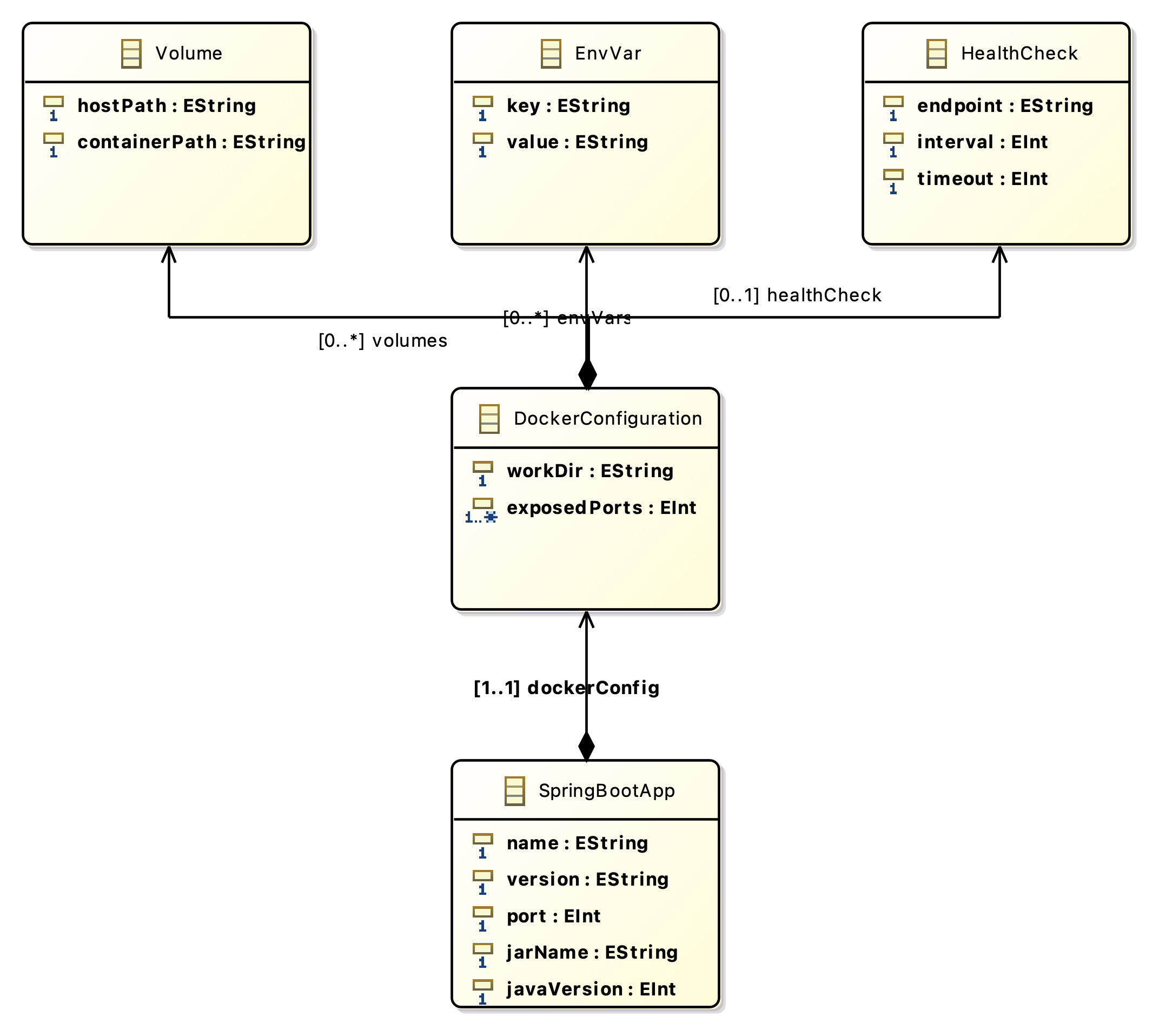
5.2 EMF Metamodel Structure
The metamodel is defined in emfdockermodel/model/emfdockermodel.ecore:
5.3 OCL Constraints: Semantic Validation
While Ecore defines structural properties, OCL (Object Constraint Language) enforces semantic rules—constraints that cannot be expressed through type systems alone. These constraints are embedded as annotations in the Ecore metamodel:
Constraints on SpringBootApp
- Port must be between 1024 and 65535 (privileged ports rejected)
- Java version must be exactly 17
- JAR file name must end with
.jar - Application port must appear in exposed ports list
Constraints on DockerConfiguration
- WorkDir must start with
/(absolute path required) - At least one port must be exposed
Constraints on HealthCheck
- Endpoint must start with
/ - Interval must be positive
- Timeout must be positive
5.4 Validation Mechanism
Validation is implemented in EmfdockermodelValidator.java (marked with @generated NOT to preserve manual edits across regenerations):
public class EmfdockermodelValidator extends EObjectValidator {

    public boolean validateSpringBootApp_ValidPort(SpringBootApp app, DiagnosticChain diagnostics, Map<Object, Object> context) {
        if (app.getPort() < 1024 || app.getPort() > 65535) {
            addError(diagnostics, app, "Port must be between 1024 and 65535");
            return false;
        }
        return true;
    }

    public boolean validateSpringBootApp_JavaVersionIs17(SpringBootApp app, DiagnosticChain diagnostics, Map<Object, Object> context) {
        if (app.getJavaVersion() != 17) {
            addError(diagnostics, app, "Java version must be 17");
            return false;
        }
        return true;
    }

    // 12 more validation methods...
}
5.5 The Role of Validation in MDE
Validation is a critical phase that bridges the gap between syntactic correctness (which Xtext ensures) and semantic correctness (which the domain requires):
- Syntactic: "Is this valid DSL syntax?" → Xtext ensures this
- Semantic: "Does this make sense for Docker/Spring Boot?" → Validation ensures this
5.6 Advantages of EMF for This Project
- Declarative metamodel: Structure defined once in Ecore, used everywhere
- Code generation: EMF generates all Java classes from metamodel (SpringBootApp, DockerConfiguration, etc.)
- Constraint enforcement: OCL + validator ensure semantic correctness
- Ecosystem integration: Works seamlessly with Xtext, Acceleo, and other Eclipse tools
- Notification system: Models notify listeners of changes (enables reactive UIs)
6. Phase 3: Code Generation with Acceleo

Acceleo 3.7+ - Model-to-Text (M2T) Transformation Engine
Acceleo is a code generation language that transforms models into text artifacts. It provides a rich template language with loops, conditionals, and filters, making it easy to generate source code, configuration files, and documentation from models.
6.1 Code Generation in MDE Context
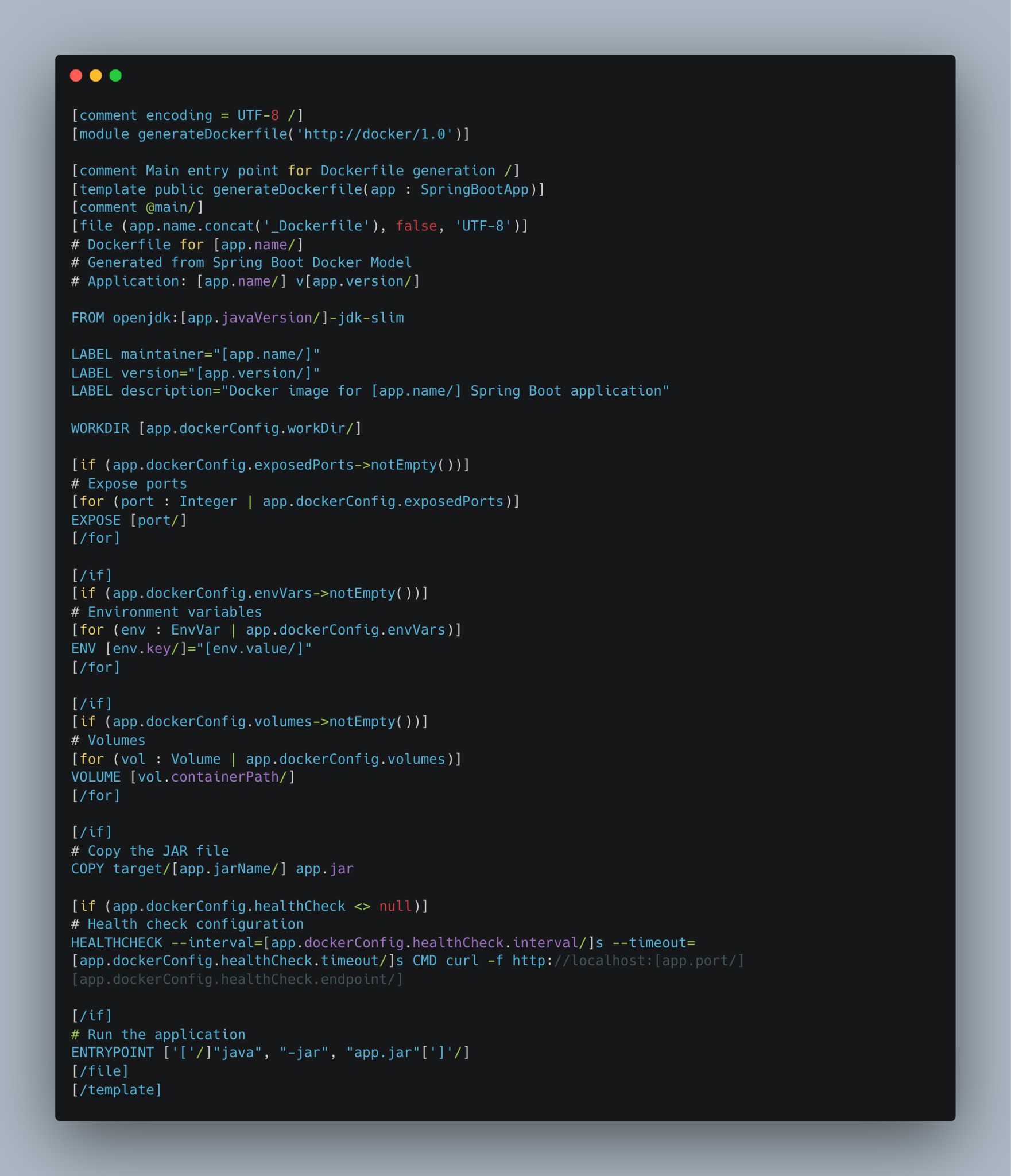
6.2 Acceleo Template Overview
The template is defined in emfdockermodel.acceleo/src/emfdockermodel/acceleo/modules/generateDockerfile.mtl. Here's the structure:
6.3 Key Acceleo Features Used
| Feature | Syntax | Purpose |
|---|---|---|
| Template definition | [template public generateDockerfile(app : SpringBootApp)] |
Define entry point with typed parameter |
| File output | [file (...)] |
Create output file from template content |
| Property access | [app.name/] |
Access model properties with type safety |
| Loops | [for (item : Type | collection)] |
Iterate over collection elements |
| Conditionals | [if (condition)] |
Generate sections conditionally |
| Comments | [comment ... /] |
Document template logic |
6.4 Best Practices in Generated Output
The template enforces Docker best practices:
- Multi-stage build considerations: Template can be extended to support build stages
- Minimal base image: Uses
openjdk:X-jdk-slim(not full JDK image) - Layer optimization: Orders Dockerfile instructions to maximize cache hits
- Exec form ENTRYPOINT: Uses
["java", "-jar", "app.jar"](not shell form) for proper signal handling - Health checks: Includes HEALTHCHECK directive for orchestration tools (Kubernetes, Docker Swarm)
- Metadata labels: Adds LABEL instructions for image identification
6.5 Example Generated Output
# Dockerfile for ProductionApp
# Generated from Spring Boot Docker Model
# Application: ProductionApp v2.0.0

FROM openjdk:17-jdk-slim
LABEL maintainer="ProductionApp"
LABEL version="2.0.0"

WORKDIR /app

# Expose ports
EXPOSE 8080
EXPOSE 9090
EXPOSE 8443

# Environment variables
ENV DATABASE_URL="jdbc:postgresql://db:5432/prod"
ENV SPRING_PROFILES_ACTIVE="production"
ENV API_KEY="***secret***"

# Volumes
VOLUME /logs
VOLUME /data

# Copy the JAR file
COPY target/product-service.jar app.jar

# Health check configuration
HEALTHCHECK --interval=30s --timeout=5s \
  CMD curl -f http://localhost:8080/health

# Run the application
ENTRYPOINT ["java", "-jar", "app.jar"]
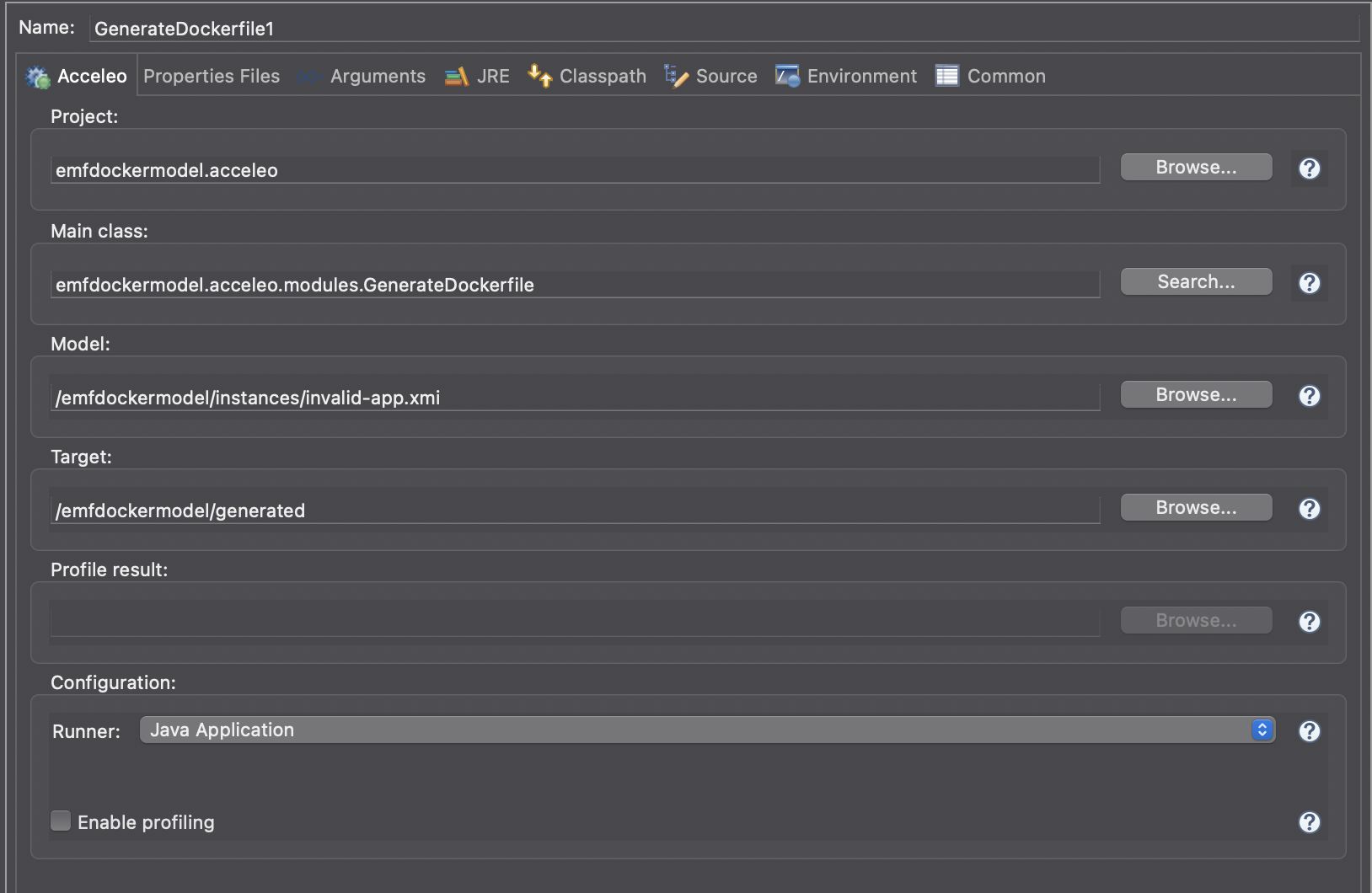
6.6 The Launcher: GenerateDockerfile.java
The Java application that orchestrates the generation process. It:
- Accepts input (DSL file or XMI model file)
- Parses input to create/load SpringBootApp model
- Validates model against OCL constraints
- Invokes Acceleo template with validated model
- Writes generated Dockerfile to output directory
6.7 Advantages of Acceleo for This Project
- Type-safe model navigation: Compiler catches typos in property names
- Powerful collection operations: Filter, map, select directly on model properties
- Traceability: Can track which model elements generated which code regions
- Reusable templates: Once written, templates work for any conforming model
- Language-agnostic: Can generate any text-based format (Java, Python, Docker, SQL, etc.)
7. Validation & Constraint Management
7.1 Multi-Level Validation Strategy
The project employs a three-level validation strategy to ensure quality:
| Level | Tool | What it Checks | Consequence of Failure |
|---|---|---|---|
| Syntactic | Xtext Parser | Is the DSL syntax valid? | Parse error, no model created |
| Structural | EMF Type System | Do property types match? | Type error at model creation |
| Semantic | OCL Validator | Do values satisfy business rules? | Validation error, generation aborted |
7.2 Validation in Practice
Scenario A: Valid Input
Result:
[OK] Model validation passed. Proceeding with generation...
[OK] Dockerfile generated: /output/ProductionApp_Dockerfile
Scenario B: Invalid Input
- port: 80 (violates 1024+ constraint)
- javaVersion: 11 (must be 17)
- jarName: "app" (must end with .jar)
- workDir: "app" (must start with /)
MODEL VALIDATION FAILED!
The model contains 4 validation error(s):
  ✗ Port must be between 1024 and 65535
  ✗ Java version must be 17
  ✗ JAR name must end with .jar
  ✗ WorkDir must start with /

Generation aborted. Fix errors and retry.
7.3 Complete Constraint List
All 14 OCL Constraints
- ValidPort: 1024 ≤ port ≤ 65535
- JavaVersionIs17: javaVersion == 17
- ValidJarName: jarName.endsWith(".jar")
- ValidName: name matches identifier rules
- AppPortIsExposed: port in exposedPorts
- HasExposedPorts: exposedPorts->notEmpty()
- ValidWorkDir: workDir.startsWith("/")
- ValidEnvKey: env key matches identifier
- ValidEnvValue: env value is non-empty
- ValidVolumePaths: both paths non-empty
- ValidContainerPath: container path starts with "/"
- ValidHealthEndpoint: endpoint starts with "/"
- PositiveInterval: interval > 0
- PositiveTimeout: timeout > 0
7.4 Why Constraint-Based Validation Matters
Constraints serve multiple purposes in this MDE project:
- Early error detection: Catch configuration errors before deployment
- Documentation: Constraints document valid configuration space
- Quality assurance: Ensure generated Dockerfiles comply with Docker best practices
- Security: Prevent risky configurations (e.g., privileged ports)
- Maintainability: Constraints are single source of truth for rules (not hardcoded in generator)
8. Results & Case Studies
8.1 End-to-End Workflow Demonstration
Step 1: Create DSL File
app MySpringApp {
    version "1.0.0"
    port 8080
    jar "my-spring-app.jar"
    java 17
    docker {
        workDir "/app"
        expose 8080
        env SPRING_PROFILES_ACTIVE = "prod", DATABASE_URL = "jdbc:postgresql://db:5432/mydb"
        volume "/logs" -> "/app/logs"
        health endpoint "/health" interval 30 timeout 5
    }
}
Step 2: Parse & Validate
[OK] DSL parsing successful
[OK] Model instantiation complete
[OK] Model validation passed
[OK] All 14 constraints satisfied
Step 3: Generate Dockerfile
# Dockerfile for MySpringApp
# Generated from Spring Boot Docker Model
# Application: MySpringApp v1.0.0

FROM openjdk:17-jdk-slim
LABEL maintainer="MySpringApp"
LABEL version="1.0.0"
LABEL description="Docker image for MySpringApp Spring Boot application"

WORKDIR /app

# Expose ports
EXPOSE 8080

# Environment variables
ENV SPRING_PROFILES_ACTIVE="prod"
ENV DATABASE_URL="jdbc:postgresql://db:5432/mydb"

# Volumes
VOLUME /logs

# Copy the JAR file
COPY target/my-spring-app.jar app.jar

# Health check configuration
HEALTHCHECK --interval=30s --timeout=5s CMD curl -f http://localhost:8080/health

# Run the application
ENTRYPOINT ["java", "-jar", "app.jar"]
8.2 Error Prevention in Action
Example: Invalid Port Configuration
app WebApp {
    port 80  [error: priviliged port below 1024]
    ...
}
System Response:
✗ VALIDATION FAILED
  Error: Port must be between 1024 and 65535
  Generation aborted.
Example: Missing Constraint
app BadApp {
    port 9000
    expose 8080, 9090  [error: port 9000 not in exposed list]
    ...
}
System Response:
✗ VALIDATION FAILED
  Error: Application port must be in exposed ports list
  Generation aborted.
8.3 Quality Metrics
| Metric | Value | Significance |
|---|---|---|
| OCL Constraints | 14 | Comprehensive validation coverage |
| DSL Keywords | 12 | Readable, domain-specific syntax |
| Metamodel Classes | 5 | Minimal, focused design |
| Acceleo Templates | 1 main + 7 helper | Modular, reusable generation logic |
| Generated Code | ~35 lines/app | Concise, non-redundant output |
9. Conclusion & Future Work
9.1 Summary of Achievements
This project demonstrates a complete, production-grade application of Model-Driven Engineering principles to the real-world problem of Docker configuration generation. The key achievements are:
- Domain-Specific Language: Designed and implemented Xtext DSL for Docker configuration
- Robust Metamodel: Comprehensive Ecore metamodel with 14 OCL constraints
- Automated Validation: Multi-level validation ensuring semantic correctness
- Code Generation: Acceleo-based generator producing best-practice Dockerfiles
- IDE Integration: Eclipse editor with syntax highlighting and content assist
- Error Prevention: Validation aborts generation on invalid input, preventing deployment of misconfigured containers
9.2 Academic Contributions
This project contributes to the MDE field by:
- Practical demonstration: Shows how MDE principles apply to DevOps/containerization domain
- Constraint-driven design: Illustrates power of declarative constraint specifications
- Tool integration: Demonstrates seamless integration of Xtext, EMF, and Acceleo in a cohesive pipeline
- Educational value: Provides clear examples of metamodeling, DSL design, and code generation
9.3 Future Extensions
Phase 2: Command-Line Interface
Objective: Make the tool deployable outside Eclipse for CI/CD pipelines
- Extract core logic into standalone Maven modules
- Create CLI tool using Picocli framework
- Package as executable fat JAR with all dependencies
- Integration with Maven, Gradle, CI/CD systems (Jenkins, GitLab CI, GitHub Actions)
Phase 3: Spring Boot Integration
Objective: Provide DSL-to-Dockerfile functionality as Spring Boot dependency
- Create Spring Boot auto-configuration
- Expose REST API for DSL → Dockerfile conversion
- Integration with Spring Shell for interactive shell
- Properties-based configuration (spring.docker-dsl.*)
Phase 4: Advanced Features
Objective: Extend metamodel and generator for advanced scenarios
- Multi-stage Docker builds
- Kubernetes manifest generation
- Docker Compose configuration
- Non-Spring Boot application support
- Custom base image selection
- Build argument support
9.4 Lessons Learned
- Models are powerful: Putting the model at the center (not the code) enables reuse, quality, and maintainability
- Constraints matter: OCL constraints document and enforce business rules more effectively than scattered code
- Separation of concerns: By separating parsing (Xtext), modeling (EMF), validation (OCL), and generation (Acceleo), each concern is managed by the right tool
- Tooling integration: Eclipse Modeling tools work together seamlessly when designed with MDE principles
- DSLs are accessible: Domain experts can understand and potentially contribute to DSL definitions
9.5 Final Thoughts
While Docker is a relatively modern tool, the principles demonstrated in this project are timeless in software engineering:
- ❌ Avoid: Manual, error-prone, repetitive tasks
- ✅ Embrace: Automated generation from high-level specifications
- ❌ Avoid: Scattered, implicit business rules
- ✅ Embrace: Centralized, explicit constraint specifications
- ❌ Avoid: Tight coupling between concerns
- ✅ Embrace: Clean separation via models and transformations
This project proves that Model-Driven Engineering is not just academic—it delivers real value in practical domains like containerization and DevOps.
References & Further Reading
Core Technologies
- Eclipse Modeling Framework (EMF) - Official documentation and tutorials
- Xtext - Language Engineering Made Easy - DSL framework documentation
- Acceleo - Model-to-Text Generation - Code generation language
- Object Constraint Language (OCL) - OMG specification
MDE Concepts
- Brambilla, M., Cabot, J., & Wimmer, M. (2017). Model-Driven Software Engineering in Practice. Synthesis Lectures on Software Engineering.
- France, R., & Rumpe, B. (2007). Model-driven development of complex software: A research roadmap. In Future of Software Engineering.
Docker & Container Best Practices
Related Tools
- Apache Maven - Build automation
- Eclipse IDE - Development environment